

Beschreibung
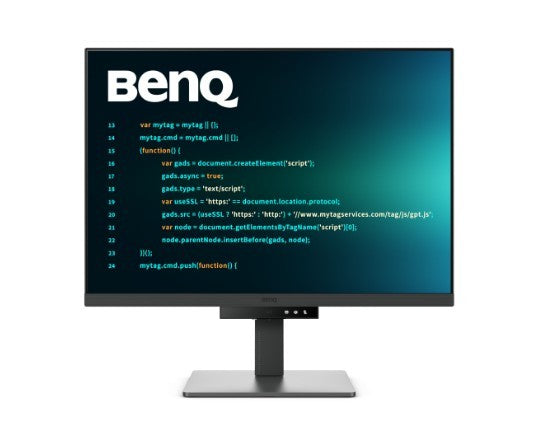
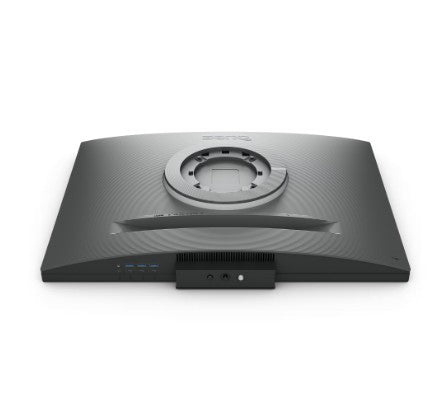
Benq Monitor 28 inches RD280U 4K IPS 5ms/IPS/1200:1/HDMI/DP
Specifications
| TCO Certified | Yes |
|---|---|
| Model | RD280U |
| Description | Crystal-clear coding, clarity without glare Designed for developers: BenQ programming monitors let you fully immerse yourself in your code, wherever you are. Innovative BenQ Nano Matte Panel Get into coding within seconds with the Nano Matte Panel. Its low-reflection surface minimizes distractions, helping you stay focused with advanced anti-glare technology. Superior code differentiation BenQs advanced Coding Modes deliver crystal-clear fonts and enhanced code differentiation, reducing eye strain during extended coding sessions. Code with comfort and efficiency Support for both dark and light themes in customizable coding environments. Quickly adjust brightness, sharpness, and contrast for the optimal coding experience. Productivity with an anti-glare panel Unlock maximum productivity with BenQs exclusive anti-glare, low-reflection Nano Matte Panel, designed specifically for developers. Enhance your coding experience with technology that minimizes visual distractions. Exceptional code differentiation BenQs advanced Coding Modes deliver crystal-clear fonts and enhanced code differentiation, reducing eye strain during long coding sessions. Code with comfort and efficiency Support for both dark and light themes in customizable coding environments. Quickly adjust brightness, sharpness, and contrast for the optimal coding experience. Stay focused anytime with MoonHalo Experience BenQ MoonHalo, the integrated rear monitor lighting system. With adjustable color temperature, brightness, lighting modes, and automatic dimming powered by Brightness Intelligence Gen2, MoonHalo delivers optimal eye comfort and helps you stay focused whether you're working from home or in the office. Take control of your display settings with Display Pilot 2 Display Pilot 2 gives you complete control over your display settings. Easily customize features including MoonHalo controls, shortcuts, Desktop Partition, Application Mode, Software Dimming, Circadian Mode, and more. Assign different modes to different applications Application Mode makes it easy to assign different color modes and remembers your preferred settings for each application. Pair your IDE with the advanced Coding Modes of the RD Series for the ultimate coding workflow. Circadian Mode for enhanced eye comfort BenQ Low Blue Light Plus includes Circadian Mode, which automatically adjusts the screens color temperature throughout the day to reflect the natural cycle from sunrise to sunset. Enjoy lasting eye comfort throughout the day. Boost productivity with Display Pilot 2 shortcuts Exclusive Shortcuts let you easily assign frequently used functions to keyboard shortcuts. With Display Pilot 2, copy and paste shortcuts are no longer limited to a single shortcut set-it conveniently remembers two clipboard sets simultaneously. Ergonomic monitor adjustments for your comfort Enhance your coding workspace with height, tilt, and swivel adjustments, ensuring optimal productivity and long-lasting comfort. Optimal posture, outstanding performance Relieve long-term neck and body strain. BenQ programming monitors prioritize your comfort during extended development projects. Endless horizons, intuitive workflows Whether you're working across multiple displays or comparing data on a single screen, BenQ programming monitors are built to support your multitasking workflow. See more, scroll less With its distinctive 3:2 aspect ratio, the RD280U is purpose-built for developers, providing a larger vertical viewing area. Seamless connectivity with effortless plug-and-play BenQ programming monitors offer a wide range of connectivity options, including USB-C for convenient all-in-one connectivity. Maximum efficiency and multitasking Boost productivity with seamless integration across multiple devices, flexible screen partitioning, and a built-in KVM (Keyboard, Video, Mouse) switch for effortless source switching. 90W USB Type-C daisy chaining Multi-Stream Transport (MST) technology lets you extend your desktop across multiple displays using USB Type-C. The 90W USB Type-C connection enables fast transfer of photos, videos, and other data while simultaneously charging your mobile devices-all with a single cable. Please note that Mac and MacBook devices support daisy chaining only through Thunderbolt. Daisy chaining is not supported via HDMI or standard USB ports on any device. In addition, Mac devices with M1 or M2 chips support only one external display. For more information about connecting different Mac models to external displays, please visit the Apple website. Coding HotKey and Function Bar Boost your productivity effortlessly with our unique Coding HotKey and Function Bar. A quick press of the Coding HotKey at the center of the Function Bar instantly immerses you in your coding environment. Keep your eyes free from fatigue Experience outstanding eye comfort during nighttime use with Night Hours Protection and Brightness Intelligence Gen2. BenQ Eye-Care technology is designed to enhance visual comfort throughout your workday. Night Hours Protection Take advantage of minimum brightness technology to reduce eye strain and enjoy enhanced eye protection at night with Night Hours Protection. Intelligent ambient light detection and automatic switching require minimal user intervention, providing effortless and continuous eye care. Brightness Intelligence Gen2 BenQ Brightness Intelligence Gen2 automatically detects ambient lighting conditions and adjusts screen brightness accordingly, while still allowing you to fine-tune brightness manually. Code with fresh eyes The TÜV Reflection Free certification ensures distraction-free coding by minimizing screen reflections for a clearer and more productive programming experience. TÜV Rheinland has also certified the RD280Us Low Blue Light technology as truly eye-friendly. The Eyesafe 2.0 certification ensures reduced blue light exposure while preserving vivid, accurate colors. BenQs green commitment: a vision for sustainability BenQ prioritizes environmentally responsible practices throughout the development of its products, reinforcing its commitment to sustainability. BenQ programming monitors incorporate eco-friendly technologies, recycled materials, and energy-efficient design. |
| Aspect ratio | 3:2 |
| Screen size (diag.) | 28.2" |
| Matrix type | TFT IPS |
| Display surface | Matt |
| Touch screen | No |
| Transreflective technology | LED |
| Resolution | 3840 x 2560 |
| Response time | 5 |
| Brightness | 350 |
| Brightness HDR | 400 |
| Static contrast | 1 200:1 |
| Refresh rate | 60 |
| Viewing angle, horizontal | 178 |
| Viewing angle, vertical | 178 |
| Number of colors | 1,07 mld |
| I/O connectors | 2 x USB 3.2 Type-C Gen 1 |
| I/O connectors | 1 x HDMI |
| I/O connectors | 1 x USB (Type B) |
| I/O connectors | 3 x USB 3.2 Type-A Gen 1 |
| I/O connectors | 1 x 3,5 mm minijack |
| I/O connectors | 1 x DisplayPort |
| Bluetooth | No |
| WiFi | No |
| Speakers built-in | Yes |
| TV tuner built-in | No |
| Web camera | None |
| Auto Pivot | No |
| Height adjustment | Yes |
| Height adjustment range | 110 |
| Certificates | Eyesafe Display |
| Certificates | TUV |
| Certificates | Energy Star |
| Certificates | EPEAT |
| Certificates | TCO |
| VESA | 100 x 100 |
| Power consumption | 34 |
| Energy class | G |
| Accessories included | QSG (Quick Start Guide) Warranty Card Safety Instructions |
| Color | Gray |
| Height | 474.3 |
| Height (max) | 587.3 |
| Width | 610.4 |
| Depth | 244.5 |
| Weight | 7.5 |
| Weight with stand | 10.4 |
Das könnte Ihnen auch gefallen
Zuletzt angesehen
Sichere Zahlung auf unserer Website